
HanFlow Cut
Cut, join and add subtitles
Cut, join and add subtitles
all on one screen
Trim and change speed on the timeline, add subtitles, icons and background music, then export to MP4. Auto captions turn speech into subtitles, too.
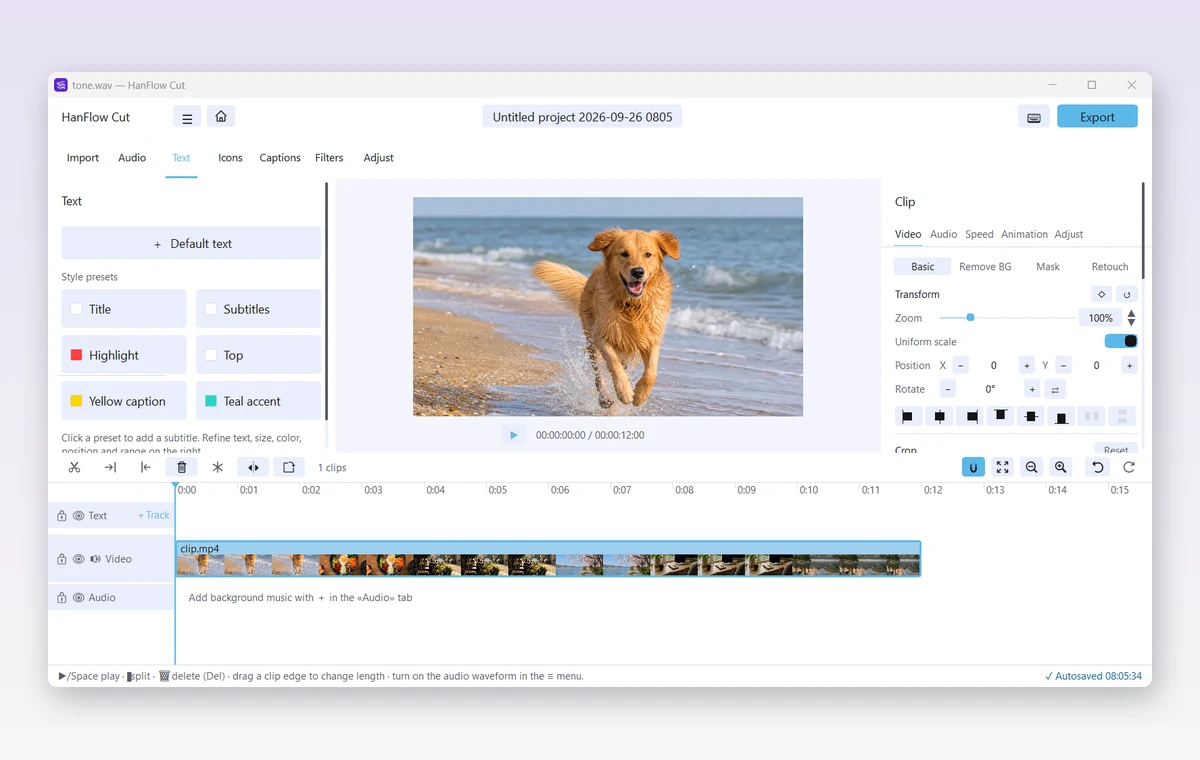
Edit
- Import video, photos and audio · split · delete · trim
- Speed 0.5× · 1× · 2× · mute · detach audio · reverse playback
- 5 filters · brightness, contrast, saturation · fade and black/white transitions
- Zoom · position · rotate · mirror · opacity · remove background by color
- 4 overlay tracks · icons and decorative art · eyedropper color picker
- Background music and sound effects · voice recording · audio waveform view
- Autosave · lossless trimming
Subtitles and export
- 6 subtitle presets · outlines · speech bubbles · entrance and exit effects
- Import .srt subtitle files
- Auto captions — turn speech into subtitles (the app downloads the speech model once, the first time)
- Video size optimization — shrink the file with one click
Supported formats
| Open video | MP4 · MOV · M4V · AVI · MKV · WebM · WMV |
|---|---|
| Open photo | PNG · JPG · BMP · GIF · WebP · TIFF |
| Open audio | MP3 · WAV · M4A · AAC · FLAC · OGG · WMA |
| Export | MP4 (H.264 · AAC) · M4A · original up to 4K · 24–60 fps |
| Operating system | Windows (64-bit) |